A really quick solution that I always have to look up.
Every once in a while I need to find some table in a database, I don't know the name of it but I have an idea of how one of the columns is called.
For example - if I have a ZenCart database and I want to know where tracking numbers are stored I can guess that the column name might contain the string track in it.
So for MySQL I can run a simple query:
SELECT
TABLE_SCHEMA,
TABLE_NAME,
COLUMN_NAME
FROM
information_schema.columns
WHERE information_schema.columns.COLUMN_NAME LIKE '%track%'
It's that simple.
What about SQL server:
SELECTcols.name as col_name, tbls.name AS tbl_name
FROM sys.all_columns cols
INNER JOIN sys.all_objects tbls ON cols.object_id = tbls.object_id AND tbls.type='u'
WHERE cols.name LIKE '%track%'
That's it!
Tuesday, December 18, 2012


Monday, August 30, 2010
Free Outlook/Windows Dialer For Astrisk
I have been using Asterisk as the PBX for my business and I am a big fan.
I am not a Guru by any means but I was able to get it to do what I need so far so I am pretty happy with the technology.
I am very bad with reading and dialing numbers - not sure why that is but If I try to manualy dial a phone number, especially one I don't usualy dial I have a success rate of about 60%.
Since most of the phone numbers I use are in outlook or in Windows somewhere I thought it would be great if I can have a "Click To Dial" button on my computer or something similar to that feature. It took a while to research and through different forum posts I found out there is such a plug in that is free from a company called ThirdLane. In order to obtain this dialer you need to register and it is available foor download.
Note to readers - after my inital post I found a different product which I like better because it has more features under Asterisk. The product is called Outcall from Bicom systems. Free and Open Source available: http://www.bicomsystems.com/
I left the inital instructions.
The instructions I saw on the site were not very clear so I figured I would document the process a little better.
Installing the dialer:
Go to http://www.thirdlane.com/ select download, register if needed and download the dialer.
After you install the product you will have a small window on the right top corner of the desktop.
Because the dialer is not registered with Asterisk it will be red.

.
And hit enter
Once logged in

and hit enter
And try to place a call.
You can look in the console window and see what is going on.
If you see something like:
I am not a Guru by any means but I was able to get it to do what I need so far so I am pretty happy with the technology.
I am very bad with reading and dialing numbers - not sure why that is but If I try to manualy dial a phone number, especially one I don't usualy dial I have a success rate of about 60%.
Since most of the phone numbers I use are in outlook or in Windows somewhere I thought it would be great if I can have a "Click To Dial" button on my computer or something similar to that feature. It took a while to research and through different forum posts I found out there is such a plug in that is free from a company called ThirdLane. In order to obtain this dialer you need to register and it is available foor download.
Note to readers - after my inital post I found a different product which I like better because it has more features under Asterisk. The product is called Outcall from Bicom systems. Free and Open Source available: http://www.bicomsystems.com/
I left the inital instructions.
The instructions I saw on the site were not very clear so I figured I would document the process a little better.
Installing the dialer:
Go to http://www.thirdlane.com/ select download, register if needed and download the dialer.
After you install the product you will have a small window on the right top corner of the desktop.
Because the dialer is not registered with Asterisk it will be red.

Configuring Asterisk
In order to allow the dialer to speak to asterisk you will need to edit a single configuration file.
The file to be edited is in /etc/asterisk/manager_custom.conf. It might be somewhere else in your system.
If you are using Windows like I do - you can use WinSCP to connect and edit the file.
We will add a new section to the file, detailing a username, passord and permissions. These permissions will allow the dialer to log in to the Asterisk Manager Interface and originate the calls for you:

.
The text will look something like:
[outlook]

secret = PASSWORD

deny=0.0.0.0/0.0.0.0

permit=192.168.XXX.XXX/255.255.255.XXX

read = system,call,log,verbose,command,agent,user,config,command,dtmf,reporting,cdr,dialplan,originate

write = system,call,log,verbose,command,agent,user,config,command,dtmf,reporting,cdr,dialplan,originate
You will need to change the following:
Set username:
The part that says [outlook] specifies the username so you can make it anything you want. Don't use admin or any of the other ones specified in previous sections on the page
Set Password:
The word PASSWORD in this sample (the value for secret) should be replaced by a password that you assign and note for yourself.
Set IP ACL:
The permit keyword lists the IP address and netmask for the addresses that the username is allowed to connect. For example, if you use the adress range 192.168.0.1-192.168.0.254 in your network and want to allow access to any computer on that network you would specify:
192.168.0.1/255.255.255.0 if you only want ip address 192.168.5.9 to access you would specify:192.168.5.9/255.255.255.255.
If you want to specify multiple ranges, you can add additional lines.
Apply Settings
The next step is to apply the settings - log on to an Asterisk Console.
(I do this using putty to ssh my asterisk computer).
Once logged in type the following:
asterisk -r
And hit enter
Once logged in
reload
You can keep this window open to see how things progress.
Configuring the dialer
Next step is to configure the dialer. Right Click the dialer (anywhere in the red zone) in windows and select Options. Click on the Connection tab.
You will see the following window:

The settings to edit:
Connection Type: Asterisk Manager Interface
Host: the IP address of the Asterisk server
Port: Default is 5038
Manager User:This is the username from before
Manager Password: The password from before
My Phone (Channel):This is the channel that the calls will be transfered to - for example, if you have a SIP extension number 200 you would fill it with SIP/200. When you click the call button the call will be initiated and you phone will ring.
Context:The appropriate Asterisk Context, in Elastix and TrixBox this is "from-internal"
Click OK and wait a few seconds.
If everything was alright - the dialer box will turn green.
Testing/troubleshooting:
In order to test this you can simply try to place a call. using the dialer. If you are running into problems do the following:
Go back to your console window and type:
core set verbose 999
and hit enter
And try to place a call.
You can look in the console window and see what is going on.
If you see something like:
== Connect attempt from '192.168.xxx.xxx' unable to authenticate
It means your username and password are worong.
You can
This tuturial was done on Elastix 2.01, Outlook 2007 and Windows 7
Happy Dialing!
Wednesday, May 5, 2010
Parsing Search Terms from URL in SQL Server
I often have the save the referrer URL for sites I work on to see where the visitors are coming from.
I needed a quick way to figure out what were people searching when they came from a search engine.
Most search engines will have the search term in the query string as q=search+term it could be in the middle, end or beginning of the query string.
I created a quick UDF to parse these and return the search term:
CREATE FUNCTION fnGetSearchTerms (@MyUrl nvarchar(1000))
RETURNS VARCHAR(500)
AS
BEGIN
DECLARE @idx int --Index of the search term
DECLARE @iex int --Index of the seperator after the search term
SET @idx =1
--Return value
DECLARE @Ret varchar(500)
WHILE ((SUBSTRING(@MyUrl,@idx,3)!='&q=') AND (SUBSTRING(@MyUrl,@idx,3)!='?q=') ) AND @idx < LEN(@MyUrl)
BEGIN
SET @idx = @idx+1
END
IF ((SUBSTRING(@MyUrl,@idx,3)='&q=') OR (SUBSTRING(@MyUrl,@idx,3)='?q=') )
BEGIN
SET @idx=@idx+3
SET @iex=Charindex('&',@MyUrl,@idx+3)
if @iex=0
BEGIN
SET @iex = LEN(@MyUrl)+1
END
SET @Ret=SUBSTRING(@MyUrl, @idx, @iex-@idx)
END
SET @Ret=REPLACE(@Ret,'+',' ')
RETURN @Ret
END
go
I needed a quick way to figure out what were people searching when they came from a search engine.
Most search engines will have the search term in the query string as q=search+term it could be in the middle, end or beginning of the query string.
I created a quick UDF to parse these and return the search term:
CREATE FUNCTION fnGetSearchTerms (@MyUrl nvarchar(1000))
RETURNS VARCHAR(500)
AS
BEGIN
DECLARE @idx int --Index of the search term
DECLARE @iex int --Index of the seperator after the search term
SET @idx =1
--Return value
DECLARE @Ret varchar(500)
WHILE ((SUBSTRING(@MyUrl,@idx,3)!='&q=') AND (SUBSTRING(@MyUrl,@idx,3)!='?q=') ) AND @idx < LEN(@MyUrl)
BEGIN
SET @idx = @idx+1
END
IF ((SUBSTRING(@MyUrl,@idx,3)='&q=') OR (SUBSTRING(@MyUrl,@idx,3)='?q=') )
BEGIN
SET @idx=@idx+3
SET @iex=Charindex('&',@MyUrl,@idx+3)
if @iex=0
BEGIN
SET @iex = LEN(@MyUrl)+1
END
SET @Ret=SUBSTRING(@MyUrl, @idx, @iex-@idx)
END
SET @Ret=REPLACE(@Ret,'+',' ')
RETURN @Ret
END
go
Quick and simple
Friday, April 23, 2010
Free downloads every programmer needs
So everyone has a go to list of favorite programs/util that go on your machine as soon as it is setup - these are mine:
Putty - your ssh telnet machine to log into your various unix/linux/asterisk boxes
Winscp - moving files in and out of your various unix/linux boxes and the occasional editing
Wink - create annotated screen captures and tuturials quickly
Notepad++ - Quick and dirty text/code editor on steriods
IrfanView - Resize and manipulate images, change format, compress etc.
WinMerge - Find differences between files and directories and merge versions of the same file
WinDirStat - graphic representation of hard drive usage
Audacity- A great sound editor
Putty - your ssh telnet machine to log into your various unix/linux/asterisk boxes
Winscp - moving files in and out of your various unix/linux boxes and the occasional editing
Wink - create annotated screen captures and tuturials quickly
Notepad++ - Quick and dirty text/code editor on steriods
IrfanView - Resize and manipulate images, change format, compress etc.
WinMerge - Find differences between files and directories and merge versions of the same file
WinDirStat - graphic representation of hard drive usage
Audacity- A great sound editor
Friday, May 8, 2009
Sending Emails from .Net using Google's SMTP servers
The .Net framework has a few classes to handle mail.
The System.Net.Mail namespace will let you send an email message via the SMTP server configured in your web.config file or app.config file.
This works very well for many providers - but if you are using Gmail or google apps things get a little sticky since the only way to connect to the SMTP servers is using SSL which is not supported by system.net.mail.
I found a workaround this problem using an open source component called stunnel - stunnel allows you to create SSL tunnels to communicate with specific addresses and ports.
The way this would work is this:
1. we will tell our program to send email using SMTP to a non standard port (say 8025 instead of 25).
2. We will tell STunnel to listen on this port and forward all the traffic through an SSL tunnel to Google's SMTP server.
So here are the step by step directions:
1. Download the Stunnel installer from Stunnel.Org - http://www.stunnel.org/ - install this on your server
2. go to the the install directory for stunnel and change the stunnel.conf file to look like:
cert = stunnel.pem
socket = l:TCP_NODELAY=1
socket = r:TCP_NODELAY=1
;debug = 7
output = stunnel.log
; Use it for client mode
client = yes
[GmailSMTP]
accept = XXX.XXX.XXX.XXX:8025
connect = smtp.gmail.com:465
You will need to replace XXX.XXX.XXX.XXX with the IP address for the server you are running on - do not use localhost or 127.0.0.1 - they failed for me.
3. From the start menu do - stunnel service install and then stunnel servic start (you can change the start mode for the service to automatic also).
4. You can test your work - so far - open a command prompt window and type the following:
Telnet XXX.XXX.XXX.XXX:8025 (where XXX.XXX.XXX.XXX is the address above).
If everything works well you should see something like:
220 mx.google.com ESMTP q18sm6397127pog.5
Close the window.
5. In your application edit the System.Net configuration section of web.config or app.config as follows:
<system.net>
<mailsettings>
<smtp from="name@domain.com" >
<network host="XXX.XXX.XXX.XXX"
port="8025"
password="YOUR PASSWORD" userName="name@domain.com">
</smtp>
</mailsettings>
</system.net>
That should do it.
The inspiration for this was an article I read here:
http://quack.me/2007/02/gmail_via_pop3_on_exchange.php
The System.Net.Mail namespace will let you send an email message via the SMTP server configured in your web.config file or app.config file.
This works very well for many providers - but if you are using Gmail or google apps things get a little sticky since the only way to connect to the SMTP servers is using SSL which is not supported by system.net.mail.
I found a workaround this problem using an open source component called stunnel - stunnel allows you to create SSL tunnels to communicate with specific addresses and ports.
The way this would work is this:
1. we will tell our program to send email using SMTP to a non standard port (say 8025 instead of 25).
2. We will tell STunnel to listen on this port and forward all the traffic through an SSL tunnel to Google's SMTP server.
So here are the step by step directions:
1. Download the Stunnel installer from Stunnel.Org - http://www.stunnel.org/ - install this on your server
2. go to the the install directory for stunnel and change the stunnel.conf file to look like:
cert = stunnel.pem
socket = l:TCP_NODELAY=1
socket = r:TCP_NODELAY=1
;debug = 7
output = stunnel.log
; Use it for client mode
client = yes
[GmailSMTP]
accept = XXX.XXX.XXX.XXX:8025
connect = smtp.gmail.com:465
You will need to replace XXX.XXX.XXX.XXX with the IP address for the server you are running on - do not use localhost or 127.0.0.1 - they failed for me.
3. From the start menu do - stunnel service install and then stunnel servic start (you can change the start mode for the service to automatic also).
4. You can test your work - so far - open a command prompt window and type the following:
Telnet XXX.XXX.XXX.XXX:8025 (where XXX.XXX.XXX.XXX is the address above).
If everything works well you should see something like:
220 mx.google.com ESMTP q18sm6397127pog.5
Close the window.
5. In your application edit the System.Net configuration section of web.config or app.config as follows:
<system.net>
<mailsettings>
<smtp from="name@domain.com" >
<network host="XXX.XXX.XXX.XXX"
port="8025"
password="YOUR PASSWORD" userName="name@domain.com">
</smtp>
</mailsettings>
</system.net>
That should do it.
The inspiration for this was an article I read here:
http://quack.me/2007/02/gmail_via_pop3_on_exchange.php
Friday, February 13, 2009
Disable user interface during ajax postbacks on ASP.Net
One of the biggest issues I have with public facing websites I work on is double clicks on buttons or users interrupting the postback process. This happens a lot with the payment button of credit card transactions and other time consuming postbacks.
I have done some Javascript and CSS tweaks and tricks to handle specific controls and I was unable to get something I was truely happy with.
Until I met jQuery. jQuery is a javascript library that does a whole bunch of things, introduces shortend syntax and a pluggable API. It can be downloaded at http://jquery.com/.
Coupling JQuery with a plugin called BlockUI. Can be downloaded at http://malsup.com/jquery/block/
What I came out with is a fairly generic solution for ASP.Net that handles all the ajax postbacks for a specific page or website by wiring the application_beginRequest and application_endRequest on the client side.
So here is the recipe:
Ingrediants -
1. ASP.Net 3.5 website
2. An aspx webpage
3. A script manager with a reference to:
6. Add your update panels with contect templates and you are good to go.


I have done some Javascript and CSS tweaks and tricks to handle specific controls and I was unable to get something I was truely happy with.
Until I met jQuery. jQuery is a javascript library that does a whole bunch of things, introduces shortend syntax and a pluggable API. It can be downloaded at http://jquery.com/.
Coupling JQuery with a plugin called BlockUI. Can be downloaded at http://malsup.com/jquery/block/
What I came out with is a fairly generic solution for ASP.Net that handles all the ajax postbacks for a specific page or website by wiring the application_beginRequest and application_endRequest on the client side.
So here is the recipe:
Ingrediants -
1. ASP.Net 3.5 website
2. An aspx webpage
3. A script manager with a reference to:
- The JQeury library
- Block UI plugin
- A very short Javascipt file (enclosed below)
4. An update panel
Instructions:
1. Create your website - I use Visual Studio 2008
2. Add your page or your master page
3. Create a js directory and add the downloaded scripts from jQuery and JBlockUI
4. Add a new file to the js directory called wireRequestEvents.js
with the following code:
Sys.WebForms.PageRequestManager.getInstance().add_beginRequest(BeginRequestHandler);
Sys.WebForms.PageRequestManager.getInstance().add_endRequest(EndRequestHandler);
function BeginRequestHandler(sender, args)
{
$.blockUI();
}
function EndRequestHandler(sender, args)
{
$.unblockUI();
}
5. Drop a script manager in your page with the following syntax:
6. Add your update panels with contect templates and you are good to go.
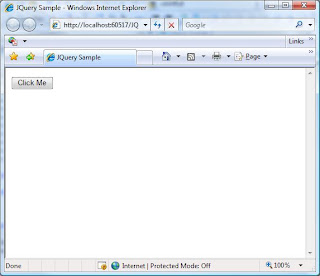
To demonstrate the technique I created a simple page with a button and a label inside an update panel. Once clicked the button waits 4 seconds and then changes the label. This imulates a long transaction on the server.
Here is what the users will see:


After they click the button the UI is blocked by a semi transperant div

When the request returns the users will see the updated screen

Pretty simple!
The code for this is available at http://www.simplicityc.com/files/JQuerySample.zip
Monday, January 14, 2008
Code Camp 2008.1 - t-Sql to CLR performance comparison testing and Cursor Avoidance Techniques
We had a great session at Code Camp. Thanks to Sebastian Meine who did most of the work for the session. I contributed by brainstorming with Sebastian, coding the CLR components of the project and walking through the code.
We concluded that there is no conclusion...CLR is faster for some things and T-SQL is faster for others. There are some very big limitations to the CLR integration in SQL server - the main one is the 8000 byte limit when serializing custom aggregates and the indifference to order in those functions.
We also played with some neat SQL-2005 enhancements like common table expressions and Cross apply which was new for some of the users.
I will try to get the code from Sebastian and post it here.
We concluded that there is no conclusion...CLR is faster for some things and T-SQL is faster for others. There are some very big limitations to the CLR integration in SQL server - the main one is the 8000 byte limit when serializing custom aggregates and the indifference to order in those functions.
We also played with some neat SQL-2005 enhancements like common table expressions and Cross apply which was new for some of the users.
I will try to get the code from Sebastian and post it here.
Subscribe to:
Posts (Atom)