A really quick solution that I always have to look up.
Every once in a while I need to find some table in a database, I don't know the name of it but I have an idea of how one of the columns is called.
For example - if I have a ZenCart database and I want to know where tracking numbers are stored I can guess that the column name might contain the string track in it.
So for MySQL I can run a simple query:
SELECT
TABLE_SCHEMA,
TABLE_NAME,
COLUMN_NAME
FROM
information_schema.columns
WHERE information_schema.columns.COLUMN_NAME LIKE '%track%'
It's that simple.
What about SQL server:
SELECTcols.name as col_name, tbls.name AS tbl_name
FROM sys.all_columns cols
INNER JOIN sys.all_objects tbls ON cols.object_id = tbls.object_id AND tbls.type='u'
WHERE cols.name LIKE '%track%'
That's it!
Tuesday, December 18, 2012


Monday, August 30, 2010
Free Outlook/Windows Dialer For Astrisk
I have been using Asterisk as the PBX for my business and I am a big fan.
I am not a Guru by any means but I was able to get it to do what I need so far so I am pretty happy with the technology.
I am very bad with reading and dialing numbers - not sure why that is but If I try to manualy dial a phone number, especially one I don't usualy dial I have a success rate of about 60%.
Since most of the phone numbers I use are in outlook or in Windows somewhere I thought it would be great if I can have a "Click To Dial" button on my computer or something similar to that feature. It took a while to research and through different forum posts I found out there is such a plug in that is free from a company called ThirdLane. In order to obtain this dialer you need to register and it is available foor download.
Note to readers - after my inital post I found a different product which I like better because it has more features under Asterisk. The product is called Outcall from Bicom systems. Free and Open Source available: http://www.bicomsystems.com/
I left the inital instructions.
The instructions I saw on the site were not very clear so I figured I would document the process a little better.
Installing the dialer:
Go to http://www.thirdlane.com/ select download, register if needed and download the dialer.
After you install the product you will have a small window on the right top corner of the desktop.
Because the dialer is not registered with Asterisk it will be red.

.
And hit enter
Once logged in

and hit enter
And try to place a call.
You can look in the console window and see what is going on.
If you see something like:
I am not a Guru by any means but I was able to get it to do what I need so far so I am pretty happy with the technology.
I am very bad with reading and dialing numbers - not sure why that is but If I try to manualy dial a phone number, especially one I don't usualy dial I have a success rate of about 60%.
Since most of the phone numbers I use are in outlook or in Windows somewhere I thought it would be great if I can have a "Click To Dial" button on my computer or something similar to that feature. It took a while to research and through different forum posts I found out there is such a plug in that is free from a company called ThirdLane. In order to obtain this dialer you need to register and it is available foor download.
Note to readers - after my inital post I found a different product which I like better because it has more features under Asterisk. The product is called Outcall from Bicom systems. Free and Open Source available: http://www.bicomsystems.com/
I left the inital instructions.
The instructions I saw on the site were not very clear so I figured I would document the process a little better.
Installing the dialer:
Go to http://www.thirdlane.com/ select download, register if needed and download the dialer.
After you install the product you will have a small window on the right top corner of the desktop.
Because the dialer is not registered with Asterisk it will be red.

Configuring Asterisk
In order to allow the dialer to speak to asterisk you will need to edit a single configuration file.
The file to be edited is in /etc/asterisk/manager_custom.conf. It might be somewhere else in your system.
If you are using Windows like I do - you can use WinSCP to connect and edit the file.
We will add a new section to the file, detailing a username, passord and permissions. These permissions will allow the dialer to log in to the Asterisk Manager Interface and originate the calls for you:

.
The text will look something like:
[outlook]

secret = PASSWORD

deny=0.0.0.0/0.0.0.0

permit=192.168.XXX.XXX/255.255.255.XXX

read = system,call,log,verbose,command,agent,user,config,command,dtmf,reporting,cdr,dialplan,originate

write = system,call,log,verbose,command,agent,user,config,command,dtmf,reporting,cdr,dialplan,originate
You will need to change the following:
Set username:
The part that says [outlook] specifies the username so you can make it anything you want. Don't use admin or any of the other ones specified in previous sections on the page
Set Password:
The word PASSWORD in this sample (the value for secret) should be replaced by a password that you assign and note for yourself.
Set IP ACL:
The permit keyword lists the IP address and netmask for the addresses that the username is allowed to connect. For example, if you use the adress range 192.168.0.1-192.168.0.254 in your network and want to allow access to any computer on that network you would specify:
192.168.0.1/255.255.255.0 if you only want ip address 192.168.5.9 to access you would specify:192.168.5.9/255.255.255.255.
If you want to specify multiple ranges, you can add additional lines.
Apply Settings
The next step is to apply the settings - log on to an Asterisk Console.
(I do this using putty to ssh my asterisk computer).
Once logged in type the following:
asterisk -r
And hit enter
Once logged in
reload
You can keep this window open to see how things progress.
Configuring the dialer
Next step is to configure the dialer. Right Click the dialer (anywhere in the red zone) in windows and select Options. Click on the Connection tab.
You will see the following window:

The settings to edit:
Connection Type: Asterisk Manager Interface
Host: the IP address of the Asterisk server
Port: Default is 5038
Manager User:This is the username from before
Manager Password: The password from before
My Phone (Channel):This is the channel that the calls will be transfered to - for example, if you have a SIP extension number 200 you would fill it with SIP/200. When you click the call button the call will be initiated and you phone will ring.
Context:The appropriate Asterisk Context, in Elastix and TrixBox this is "from-internal"
Click OK and wait a few seconds.
If everything was alright - the dialer box will turn green.
Testing/troubleshooting:
In order to test this you can simply try to place a call. using the dialer. If you are running into problems do the following:
Go back to your console window and type:
core set verbose 999
and hit enter
And try to place a call.
You can look in the console window and see what is going on.
If you see something like:
== Connect attempt from '192.168.xxx.xxx' unable to authenticate
It means your username and password are worong.
You can
This tuturial was done on Elastix 2.01, Outlook 2007 and Windows 7
Happy Dialing!
Wednesday, May 5, 2010
Parsing Search Terms from URL in SQL Server
I often have the save the referrer URL for sites I work on to see where the visitors are coming from.
I needed a quick way to figure out what were people searching when they came from a search engine.
Most search engines will have the search term in the query string as q=search+term it could be in the middle, end or beginning of the query string.
I created a quick UDF to parse these and return the search term:
CREATE FUNCTION fnGetSearchTerms (@MyUrl nvarchar(1000))
RETURNS VARCHAR(500)
AS
BEGIN
DECLARE @idx int --Index of the search term
DECLARE @iex int --Index of the seperator after the search term
SET @idx =1
--Return value
DECLARE @Ret varchar(500)
WHILE ((SUBSTRING(@MyUrl,@idx,3)!='&q=') AND (SUBSTRING(@MyUrl,@idx,3)!='?q=') ) AND @idx < LEN(@MyUrl)
BEGIN
SET @idx = @idx+1
END
IF ((SUBSTRING(@MyUrl,@idx,3)='&q=') OR (SUBSTRING(@MyUrl,@idx,3)='?q=') )
BEGIN
SET @idx=@idx+3
SET @iex=Charindex('&',@MyUrl,@idx+3)
if @iex=0
BEGIN
SET @iex = LEN(@MyUrl)+1
END
SET @Ret=SUBSTRING(@MyUrl, @idx, @iex-@idx)
END
SET @Ret=REPLACE(@Ret,'+',' ')
RETURN @Ret
END
go
I needed a quick way to figure out what were people searching when they came from a search engine.
Most search engines will have the search term in the query string as q=search+term it could be in the middle, end or beginning of the query string.
I created a quick UDF to parse these and return the search term:
CREATE FUNCTION fnGetSearchTerms (@MyUrl nvarchar(1000))
RETURNS VARCHAR(500)
AS
BEGIN
DECLARE @idx int --Index of the search term
DECLARE @iex int --Index of the seperator after the search term
SET @idx =1
--Return value
DECLARE @Ret varchar(500)
WHILE ((SUBSTRING(@MyUrl,@idx,3)!='&q=') AND (SUBSTRING(@MyUrl,@idx,3)!='?q=') ) AND @idx < LEN(@MyUrl)
BEGIN
SET @idx = @idx+1
END
IF ((SUBSTRING(@MyUrl,@idx,3)='&q=') OR (SUBSTRING(@MyUrl,@idx,3)='?q=') )
BEGIN
SET @idx=@idx+3
SET @iex=Charindex('&',@MyUrl,@idx+3)
if @iex=0
BEGIN
SET @iex = LEN(@MyUrl)+1
END
SET @Ret=SUBSTRING(@MyUrl, @idx, @iex-@idx)
END
SET @Ret=REPLACE(@Ret,'+',' ')
RETURN @Ret
END
go
Quick and simple
Friday, April 23, 2010
Free downloads every programmer needs
So everyone has a go to list of favorite programs/util that go on your machine as soon as it is setup - these are mine:
Putty - your ssh telnet machine to log into your various unix/linux/asterisk boxes
Winscp - moving files in and out of your various unix/linux boxes and the occasional editing
Wink - create annotated screen captures and tuturials quickly
Notepad++ - Quick and dirty text/code editor on steriods
IrfanView - Resize and manipulate images, change format, compress etc.
WinMerge - Find differences between files and directories and merge versions of the same file
WinDirStat - graphic representation of hard drive usage
Audacity- A great sound editor
Putty - your ssh telnet machine to log into your various unix/linux/asterisk boxes
Winscp - moving files in and out of your various unix/linux boxes and the occasional editing
Wink - create annotated screen captures and tuturials quickly
Notepad++ - Quick and dirty text/code editor on steriods
IrfanView - Resize and manipulate images, change format, compress etc.
WinMerge - Find differences between files and directories and merge versions of the same file
WinDirStat - graphic representation of hard drive usage
Audacity- A great sound editor
Friday, May 8, 2009
Sending Emails from .Net using Google's SMTP servers
The .Net framework has a few classes to handle mail.
The System.Net.Mail namespace will let you send an email message via the SMTP server configured in your web.config file or app.config file.
This works very well for many providers - but if you are using Gmail or google apps things get a little sticky since the only way to connect to the SMTP servers is using SSL which is not supported by system.net.mail.
I found a workaround this problem using an open source component called stunnel - stunnel allows you to create SSL tunnels to communicate with specific addresses and ports.
The way this would work is this:
1. we will tell our program to send email using SMTP to a non standard port (say 8025 instead of 25).
2. We will tell STunnel to listen on this port and forward all the traffic through an SSL tunnel to Google's SMTP server.
So here are the step by step directions:
1. Download the Stunnel installer from Stunnel.Org - http://www.stunnel.org/ - install this on your server
2. go to the the install directory for stunnel and change the stunnel.conf file to look like:
cert = stunnel.pem
socket = l:TCP_NODELAY=1
socket = r:TCP_NODELAY=1
;debug = 7
output = stunnel.log
; Use it for client mode
client = yes
[GmailSMTP]
accept = XXX.XXX.XXX.XXX:8025
connect = smtp.gmail.com:465
You will need to replace XXX.XXX.XXX.XXX with the IP address for the server you are running on - do not use localhost or 127.0.0.1 - they failed for me.
3. From the start menu do - stunnel service install and then stunnel servic start (you can change the start mode for the service to automatic also).
4. You can test your work - so far - open a command prompt window and type the following:
Telnet XXX.XXX.XXX.XXX:8025 (where XXX.XXX.XXX.XXX is the address above).
If everything works well you should see something like:
220 mx.google.com ESMTP q18sm6397127pog.5
Close the window.
5. In your application edit the System.Net configuration section of web.config or app.config as follows:
<system.net>
<mailsettings>
<smtp from="name@domain.com" >
<network host="XXX.XXX.XXX.XXX"
port="8025"
password="YOUR PASSWORD" userName="name@domain.com">
</smtp>
</mailsettings>
</system.net>
That should do it.
The inspiration for this was an article I read here:
http://quack.me/2007/02/gmail_via_pop3_on_exchange.php
The System.Net.Mail namespace will let you send an email message via the SMTP server configured in your web.config file or app.config file.
This works very well for many providers - but if you are using Gmail or google apps things get a little sticky since the only way to connect to the SMTP servers is using SSL which is not supported by system.net.mail.
I found a workaround this problem using an open source component called stunnel - stunnel allows you to create SSL tunnels to communicate with specific addresses and ports.
The way this would work is this:
1. we will tell our program to send email using SMTP to a non standard port (say 8025 instead of 25).
2. We will tell STunnel to listen on this port and forward all the traffic through an SSL tunnel to Google's SMTP server.
So here are the step by step directions:
1. Download the Stunnel installer from Stunnel.Org - http://www.stunnel.org/ - install this on your server
2. go to the the install directory for stunnel and change the stunnel.conf file to look like:
cert = stunnel.pem
socket = l:TCP_NODELAY=1
socket = r:TCP_NODELAY=1
;debug = 7
output = stunnel.log
; Use it for client mode
client = yes
[GmailSMTP]
accept = XXX.XXX.XXX.XXX:8025
connect = smtp.gmail.com:465
You will need to replace XXX.XXX.XXX.XXX with the IP address for the server you are running on - do not use localhost or 127.0.0.1 - they failed for me.
3. From the start menu do - stunnel service install and then stunnel servic start (you can change the start mode for the service to automatic also).
4. You can test your work - so far - open a command prompt window and type the following:
Telnet XXX.XXX.XXX.XXX:8025 (where XXX.XXX.XXX.XXX is the address above).
If everything works well you should see something like:
220 mx.google.com ESMTP q18sm6397127pog.5
Close the window.
5. In your application edit the System.Net configuration section of web.config or app.config as follows:
<system.net>
<mailsettings>
<smtp from="name@domain.com" >
<network host="XXX.XXX.XXX.XXX"
port="8025"
password="YOUR PASSWORD" userName="name@domain.com">
</smtp>
</mailsettings>
</system.net>
That should do it.
The inspiration for this was an article I read here:
http://quack.me/2007/02/gmail_via_pop3_on_exchange.php
Friday, February 13, 2009
Disable user interface during ajax postbacks on ASP.Net
One of the biggest issues I have with public facing websites I work on is double clicks on buttons or users interrupting the postback process. This happens a lot with the payment button of credit card transactions and other time consuming postbacks.
I have done some Javascript and CSS tweaks and tricks to handle specific controls and I was unable to get something I was truely happy with.
Until I met jQuery. jQuery is a javascript library that does a whole bunch of things, introduces shortend syntax and a pluggable API. It can be downloaded at http://jquery.com/.
Coupling JQuery with a plugin called BlockUI. Can be downloaded at http://malsup.com/jquery/block/
What I came out with is a fairly generic solution for ASP.Net that handles all the ajax postbacks for a specific page or website by wiring the application_beginRequest and application_endRequest on the client side.
So here is the recipe:
Ingrediants -
1. ASP.Net 3.5 website
2. An aspx webpage
3. A script manager with a reference to:
6. Add your update panels with contect templates and you are good to go.


I have done some Javascript and CSS tweaks and tricks to handle specific controls and I was unable to get something I was truely happy with.
Until I met jQuery. jQuery is a javascript library that does a whole bunch of things, introduces shortend syntax and a pluggable API. It can be downloaded at http://jquery.com/.
Coupling JQuery with a plugin called BlockUI. Can be downloaded at http://malsup.com/jquery/block/
What I came out with is a fairly generic solution for ASP.Net that handles all the ajax postbacks for a specific page or website by wiring the application_beginRequest and application_endRequest on the client side.
So here is the recipe:
Ingrediants -
1. ASP.Net 3.5 website
2. An aspx webpage
3. A script manager with a reference to:
- The JQeury library
- Block UI plugin
- A very short Javascipt file (enclosed below)
4. An update panel
Instructions:
1. Create your website - I use Visual Studio 2008
2. Add your page or your master page
3. Create a js directory and add the downloaded scripts from jQuery and JBlockUI
4. Add a new file to the js directory called wireRequestEvents.js
with the following code:
Sys.WebForms.PageRequestManager.getInstance().add_beginRequest(BeginRequestHandler);
Sys.WebForms.PageRequestManager.getInstance().add_endRequest(EndRequestHandler);
function BeginRequestHandler(sender, args)
{
$.blockUI();
}
function EndRequestHandler(sender, args)
{
$.unblockUI();
}
5. Drop a script manager in your page with the following syntax:
6. Add your update panels with contect templates and you are good to go.
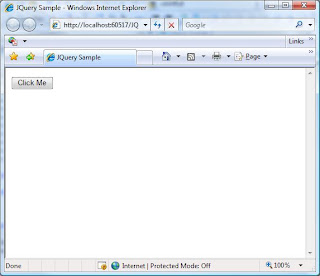
To demonstrate the technique I created a simple page with a button and a label inside an update panel. Once clicked the button waits 4 seconds and then changes the label. This imulates a long transaction on the server.
Here is what the users will see:


After they click the button the UI is blocked by a semi transperant div

When the request returns the users will see the updated screen

Pretty simple!
The code for this is available at http://www.simplicityc.com/files/JQuerySample.zip
Monday, January 14, 2008
Code Camp 2008.1 - t-Sql to CLR performance comparison testing and Cursor Avoidance Techniques
We had a great session at Code Camp. Thanks to Sebastian Meine who did most of the work for the session. I contributed by brainstorming with Sebastian, coding the CLR components of the project and walking through the code.
We concluded that there is no conclusion...CLR is faster for some things and T-SQL is faster for others. There are some very big limitations to the CLR integration in SQL server - the main one is the 8000 byte limit when serializing custom aggregates and the indifference to order in those functions.
We also played with some neat SQL-2005 enhancements like common table expressions and Cross apply which was new for some of the users.
I will try to get the code from Sebastian and post it here.
We concluded that there is no conclusion...CLR is faster for some things and T-SQL is faster for others. There are some very big limitations to the CLR integration in SQL server - the main one is the 8000 byte limit when serializing custom aggregates and the indifference to order in those functions.
We also played with some neat SQL-2005 enhancements like common table expressions and Cross apply which was new for some of the users.
I will try to get the code from Sebastian and post it here.
Thursday, January 10, 2008
Troubleshooting SQL server database mail
I am putting database mail on SQL server 2005 into use more and more these days with my consutling projects and it is making things much easier on me.
It is very easy to trigger emails based on transactions that happen on the database - like payments posted, account goes below a certain balance etc.
It is also nice to use some of the included views to see what is the status of your email messages.
If a message that I send did not reach the recipient I can check:
SELECT * FROM msdb.dbo.sysmail_faileditems
to look for that message.
Once I find it there I can can look at the mailitem_id in the msdb.dbo.sysmail_event_log view.
Happy mailing!
It is very easy to trigger emails based on transactions that happen on the database - like payments posted, account goes below a certain balance etc.
It is also nice to use some of the included views to see what is the status of your email messages.
If a message that I send did not reach the recipient I can check:
SELECT * FROM msdb.dbo.sysmail_faileditems
to look for that message.
Once I find it there I can can look at the mailitem_id in the msdb.dbo.sysmail_event_log view.
Happy mailing!
Wednesday, November 21, 2007
Where did my SQL Server Memory go?

In managing one of my servers I had to make sure everything was running the way it should. I am working on fairly big databases (in the order of 10s of gigabytes) and I wanted to make sure SQL is using all the memory it has available.
The server I am working on is an x64 windows 2003 enterprise running SQL 2005 enterprise 32 bit. The server is also equipped with 12GB of ram.
The server I am working on is an x64 windows 2003 enterprise running SQL 2005 enterprise 32 bit. The server is also equipped with 12GB of ram.
Whenever I would look into the task manager or the performance monitor the only memory allocation I see for SQL server is around 202 MB which makes no sense.
If you look at the screen capture enclosed you can see the memory allocation for SQL server.
I did some research on the subject and found the answer. SQL has a dynamic management view called sys.dm_os_memory_clerks. This view described in http://technet.microsoft.com/en-us/library/ms175019.aspx has detailed memory allocation information for SQL server. When you examine this view you can see a column that details AWE memory allocations that are detailed in the awe_allocated_kb column, in my case this was summed to the 10GB I assigned to the server. There are other useful rows columns in the view and they are documented in the technet article mentioned here.
One useful query i run constantly:
SELECT
SUM(awe_allocated_kb)/1024 AS [AWE_MEM_MB],
SUM(virtual_memory_reserved_kb)/1024 AS [VM_RES_MB],
SUM(virtual_memory_committed_kb)/1024 AS [VM_COM_MB],
SUM(shared_memory_reserved_kb)/1024 AS [SM_RES_MB],
SUM(single_pages_kb )/1024 [SNG_PAGE_MB],
SUM(multi_pages_kb )/1024 [MLT_PAGE_MB]
FROM sys.dm_os_memory_clerks
This returns the memory allocation totals in megabytes.
Thursday, November 15, 2007
Running C# and VB.Net Code on Microsoft SQL Server - Slides code and database
Thanks for coming to the November PSSUG Meeting at Microsoft.
All and all it went pretty well with a couple of Visual Studio crashes, SQL server acting funky but that comes with the territory.
As promised the code is available by clicking below:
Code, database and slides from Running C# and VB.Net Code on Microsoft SQL Server talk
I had to remove the ANTLR part of the demo since there are IP issues involved.
To get this running extract the zip file to drive c:\
it will create a folder c:\SQL_CLR
Attach the database in c:\SQL_CLR\db to sql server
You can look at a word document in c:\SQL_CLR\powerpoint\ for instructions to run the demo.
The slides are in c:\SQL_CLR\powerpoint\ also.
To run the solution open:
C:\SQL_CLR\SimpleFunctions\SimpleFunctions.sln
Good luck and let me know if you have any questions!
Sagi
All and all it went pretty well with a couple of Visual Studio crashes, SQL server acting funky but that comes with the territory.
As promised the code is available by clicking below:
Code, database and slides from Running C# and VB.Net Code on Microsoft SQL Server talk
I had to remove the ANTLR part of the demo since there are IP issues involved.
To get this running extract the zip file to drive c:\
it will create a folder c:\SQL_CLR
Attach the database in c:\SQL_CLR\db to sql server
You can look at a word document in c:\SQL_CLR\powerpoint\ for instructions to run the demo.
The slides are in c:\SQL_CLR\powerpoint\ also.
To run the solution open:
C:\SQL_CLR\SimpleFunctions\SimpleFunctions.sln
Good luck and let me know if you have any questions!
Sagi
Monday, September 17, 2007
Updated Code and Slides for the SQL CLR Integration Talk
I updated the code and the slide for the SQL Integration talk that I gave in Code Camp 2007.2 in Philadelphia.
The slides code and slides are available here:
http://www.simplicityc.com/CodeCamp2007_CLR_Integration.zip
I added a readme file that explains how to run these samples.
There are samples for:
-SQL Stored Procedure written in C#, it uses return parameters, the message channel, internal connections to the database.
-User defined Aggregate function in C#
-Table valued function in VB.Net
-Scalar Values functions in C# and VB.Net
And a couple more
The slides code and slides are available here:
http://www.simplicityc.com/CodeCamp2007_CLR_Integration.zip
I added a readme file that explains how to run these samples.
There are samples for:
-SQL Stored Procedure written in C#, it uses return parameters, the message channel, internal connections to the database.
-User defined Aggregate function in C#
-Table valued function in VB.Net
-Scalar Values functions in C# and VB.Net
And a couple more
Saturday, September 15, 2007
Thanks for coming to my talk in code camp!
Thanks for coming to my talk in code camp.
I will post the revised code on the blog tomorrow - need to run to a wedding right now.
There were serveral examples I didn't have a chance to go through but they will be in my code and slided that will be posted - tomorrow.
Enjoy the rest of the weekend!
I will post the revised code on the blog tomorrow - need to run to a wedding right now.
There were serveral examples I didn't have a chance to go through but they will be in my code and slided that will be posted - tomorrow.
Enjoy the rest of the weekend!
Friday, September 14, 2007
Code for Philly Code Camp 2007.2
The code for my session in Code Camp is available here:
http://www.simplicityc.com/CodeCamp2007_CLR_Integration.zip
If you want to run the samples you will need SQL server 2005 and Visual Studio.Net 2005.
The slides are not yet ready but they will be posted here before the talk.
http://www.simplicityc.com/CodeCamp2007_CLR_Integration.zip
If you want to run the samples you will need SQL server 2005 and Visual Studio.Net 2005.
The slides are not yet ready but they will be posted here before the talk.
Thursday, September 6, 2007
Code Camp 2007.2 Running C# and VB.Net Code on Microsoft SQL Server
I will be speaking at the Philly Code Camp 2007.2 on the subect of integrating C# and VB.Net Code on MS-SQL server 2005.
I will post my slides and code files here in a couple of days.
This is a link to the event on the PhillyDotNet website:
http://www.phillydotnet.org/Default.aspx?tabid=598
Abstract for the talk
SQL server 2005 allows .NET code to be run as functions, stored procedures, aggregate functions and other objects. In this session we will explore the integration of the .Net CLR with SQL server. We will go over the implications of running managed and unmanaged .Net code within SQL server 2005. We will talk about some useful applications for this type of integration and then we will get our hands dirty. We will create several objects in Visual Studio and deploy them in SQL server. Time permitting we will either go into debugging or informal performance testing by comparing .Net functions to native T-SQL code. This talk is geared towards DBAs and programmers alike. The code and slides will be posted ahead of time at http://blog.shkedy.com (check the night before the talk). If you are interested in running the code you will need SQL server 2005 and Visual Studio 2005 although it is not required in order to benefit from the session.
I will post my slides and code files here in a couple of days.
This is a link to the event on the PhillyDotNet website:
http://www.phillydotnet.org/Default.aspx?tabid=598
Abstract for the talk
SQL server 2005 allows .NET code to be run as functions, stored procedures, aggregate functions and other objects. In this session we will explore the integration of the .Net CLR with SQL server. We will go over the implications of running managed and unmanaged .Net code within SQL server 2005. We will talk about some useful applications for this type of integration and then we will get our hands dirty. We will create several objects in Visual Studio and deploy them in SQL server. Time permitting we will either go into debugging or informal performance testing by comparing .Net functions to native T-SQL code. This talk is geared towards DBAs and programmers alike. The code and slides will be posted ahead of time at http://blog.shkedy.com (check the night before the talk). If you are interested in running the code you will need SQL server 2005 and Visual Studio 2005 although it is not required in order to benefit from the session.
Thursday, February 15, 2007
Configuring ASP.Net 1.1 on IIS 6.0 in x64 versions of windows Server
32 vs 64 bit versions of windows server
The 32Bit version of windows 2003 does not take full advantage of 64 bit hardware. We got a double Xeon machine with windows 2003 server R2 x64 which is the 64 bit version of the OS. The advantages of the OS is the increased memory allowance (32 bit only allows 4GB form which .Net can only use 2GB, with the 64bit you can go up to 32GB of memory which makes a lot of sense for a web server.
The problem
By default iis 6.0 is running as a 64 bit host which means it will not run 32 bit applications.
ASP.Net 1.1 was never ported as a 64 bit app (2.0 was).
There is a way to configure iis to run 32 apps like ASP.Net 1.1: http://support.microsoft.com:80/?id=894435
A couple of things to know - if you allow iis to run 32 bit processes this will affect all applications. In the ASP.Net tab in IIS MMC console will disappear - making it impossible to switch between versions 1.1 and 2.0 for a specific website - this can be done only from the command prompt.
The solution
Since I have a busy web server to manage with many sites I automated the process by writing a batch file that takes 2 arguments; the .Net framework version and the target site id. The scripts Changes the registration for that site.
To make this work - open notepad and paste the following:
@echo off
IF(%1) == () GOTO :MissingArgs
IF(%2) == () GOTO :MissingArgs
IF (%1) == (1.1) GOTO :VER11
IF (%1) == (2.0) GOTO :VER20
GOTO :END
:VER11
ECHO 1.1
@echo on
c:\windows\Microsoft.NET\Framework\v1.1.4322\aspnet_regiis -s /w3svc/%2/root
@echo off
GOTO :END
:VER20
ECHO 2.0
@echo on
c:\windows\Microsoft.NET\Framework\v2.0.50727\aspnet_regiis -s /w3svc/%2/root
@echo off
GOTO :END
:MissingArgs
ECHO Usage change_asp_ver version sitenumber
:END
ECHO QUITTING
PAUSE
Save the file as change_asp_ver.bat in a directory you can recall like c:\scripts\
To run the script you will need to find out the site id that you wish to change. Open the IIS MMC console click websites and you will see the site identifier on the right.
If you want to change site id 1234 to version 1.1 and you saved the file in the scripts directory you will type:
Start->run->cmd (enter)
cd c:\scripts\ (enter)
change_asp_ver 1.1 1234 (enter)
You might need to change some of the paths in your script if you used non standard directories to install the frameworks.
This is based on a post response to microsoft.public.interserver.iis
The 32Bit version of windows 2003 does not take full advantage of 64 bit hardware. We got a double Xeon machine with windows 2003 server R2 x64 which is the 64 bit version of the OS. The advantages of the OS is the increased memory allowance (32 bit only allows 4GB form which .Net can only use 2GB, with the 64bit you can go up to 32GB of memory which makes a lot of sense for a web server.
The problem
By default iis 6.0 is running as a 64 bit host which means it will not run 32 bit applications.
ASP.Net 1.1 was never ported as a 64 bit app (2.0 was).
There is a way to configure iis to run 32 apps like ASP.Net 1.1: http://support.microsoft.com:80/?id=894435
A couple of things to know - if you allow iis to run 32 bit processes this will affect all applications. In the ASP.Net tab in IIS MMC console will disappear - making it impossible to switch between versions 1.1 and 2.0 for a specific website - this can be done only from the command prompt.
The solution
Since I have a busy web server to manage with many sites I automated the process by writing a batch file that takes 2 arguments; the .Net framework version and the target site id. The scripts Changes the registration for that site.
To make this work - open notepad and paste the following:
@echo off
IF(%1) == () GOTO :MissingArgs
IF(%2) == () GOTO :MissingArgs
IF (%1) == (1.1) GOTO :VER11
IF (%1) == (2.0) GOTO :VER20
GOTO :END
:VER11
ECHO 1.1
@echo on
c:\windows\Microsoft.NET\Framework\v1.1.4322\aspnet_regiis -s /w3svc/%2/root
@echo off
GOTO :END
:VER20
ECHO 2.0
@echo on
c:\windows\Microsoft.NET\Framework\v2.0.50727\aspnet_regiis -s /w3svc/%2/root
@echo off
GOTO :END
:MissingArgs
ECHO Usage change_asp_ver version sitenumber
:END
ECHO QUITTING
PAUSE
Save the file as change_asp_ver.bat in a directory you can recall like c:\scripts\
To run the script you will need to find out the site id that you wish to change. Open the IIS MMC console click websites and you will see the site identifier on the right.
If you want to change site id 1234 to version 1.1 and you saved the file in the scripts directory you will type:
Start->run->cmd (enter)
cd c:\scripts\ (enter)
change_asp_ver 1.1 1234 (enter)
You might need to change some of the paths in your script if you used non standard directories to install the frameworks.
This is based on a post response to microsoft.public.interserver.iis
Thursday, January 25, 2007
ClickOnce Button for ASP.Net 2.0
We have a couple of forms from which we get double submissions by people hitting the submit button again and again. We decided to go with a ClickOnce button that disables itself when the form submits. I saw a couple of solutions that implement it but nothing for ASP.Net 2.0.
I ended up implementing it in myself.
About 5 lines of code placed in the Page_Load event handler:
// Define the name and type of the client script on the page.
String csname = "OnSubmitScript";
Type cstype = this.GetType();
// Get a ClientScriptManager reference from the Page class.
ClientScriptManager cs = Page.ClientScript;
// Check to see if the OnSubmit statement is already registered.
if (!cs.IsOnSubmitStatementRegistered(cstype, csname))
{
String cstext = "if (typeof(ValidatorOnSubmit) == 'function' && ValidatorOnSubmit() == false)return false; else { var myCtl = document.getElementById('" + this.SubmitButton.ClientID + "'); myCtl.value = 'Please wait...'; myCtl.disabled = true;}";
cs.RegisterOnSubmitStatement(cstype, csname, cstext);
}
On the aspx page we have:
<asp:button id="SubmitButton" onclick="SubmitButton_Click" usesubmitbehavior="False" runat="server">
There are 2 gotchas here:
1. Make sure validation takes place and the page validates prior to disabling the button. This is done with JavaScript
2. Make sure the button is not rendered as input type submit otherwise when it is disabled it will not trigger the correct event handler on postback - for that we use: UseSubmitBehavior="False".
I ended up implementing it in myself.
About 5 lines of code placed in the Page_Load event handler:
// Define the name and type of the client script on the page.
String csname = "OnSubmitScript";
Type cstype = this.GetType();
// Get a ClientScriptManager reference from the Page class.
ClientScriptManager cs = Page.ClientScript;
// Check to see if the OnSubmit statement is already registered.
if (!cs.IsOnSubmitStatementRegistered(cstype, csname))
{
String cstext = "if (typeof(ValidatorOnSubmit) == 'function' && ValidatorOnSubmit() == false)return false; else { var myCtl = document.getElementById('" + this.SubmitButton.ClientID + "'); myCtl.value = 'Please wait...'; myCtl.disabled = true;}";
cs.RegisterOnSubmitStatement(cstype, csname, cstext);
}
On the aspx page we have:
<asp:button id="SubmitButton" onclick="SubmitButton_Click" usesubmitbehavior="False" runat="server">
There are 2 gotchas here:
1. Make sure validation takes place and the page validates prior to disabling the button. This is done with JavaScript
2. Make sure the button is not rendered as input type submit otherwise when it is disabled it will not trigger the correct event handler on postback - for that we use: UseSubmitBehavior="False".
Friday, January 19, 2007
Temporary Tables and Dynamic SQL
When programming in SQL on occasion there is a need to generate temporaty tables inside a sproc without knowing the colums or type when the sproc is written. One such situation would be when you want to pivot a table. You can create a cursor over a column result set and create a new column for each value.
When you try to create temporary tables with dynamic SQL you will run into a scoping problem.
for example:
DECLARE @SQL nvarchar(4000)
SELECT @SQL = 'CREATE TABLE #Temp (col1 int)'
EXEC (@SQL)
SELECT * FROM #Temp
When you try to create temporary tables with dynamic SQL you will run into a scoping problem.
for example:
DECLARE @SQL nvarchar(4000)
SELECT @SQL = 'CREATE TABLE #Temp (col1 int)'
EXEC (@SQL)
SELECT * FROM #Temp
This will cause an error:
Msg 208, Level 16, State 0, Line 4
Invalid object name '#Temp'.
The problem here is the scope of the session. When we execute dynamic sql via EXEC or sp_executesql a new scope is created for a child session. Any objects created in that session are dropped as soon as the session is closed.
One solution I have found for this problem is creating the table in the "parent" scope and then just using dynamic sql to modify the table. For this to work a table is created with a minimum set of colums. And then we use the ALTER TABLE statement with dynamic SQL. The Child session has access to the objects created in the parent session so the table can be modified with dynamic sql:
DECLARE @SQL NVARCHAR(4000)
CREATE TABLE #Temp ( id int null)
SELECT @SQL = 'ALTER #Temp ADD Col1 int null'
EXEC (@SQL)
SELECT * FROM #Temp
DROP TABLE #Temp
Thursday, January 18, 2007
Improving on the ASP.Net Regular expression validator for phone numbers
When I am working on web development I often use the ASP.Net regular expression validator in order to validate phone numbers.
The validation expression for US phone numbers that is built in to Visual Studio expects phone numbers in xxx-xxx-xxxx format.
The problem with that is that you alwas have to preface the prompt for the phone number with a sentence explaining the format and even then people often mess it up and do not understand why their form does not submit.
A good solution for the problem is to wire the onkeyup event that will add the dashes in all the right places.
For example this is in ASP.Net 2.0:
<asp:textbox id="homePhoneTextBox"
runat="server" maxlength="12" onkeyup="phoneFormat(this, event)"></asp:textbox>
In asp.net 1.1 you can do it on the code behind:
in c# this whould be something like:
this.homePhoneTextBox.Attributes.Add("onkeyup", ="phoneFormat(this, event)");
Now all you need to do is handle this event with a JavaScript function that will format the phone number for the user:
function phoneFormat(sender, ev)
{
var theNumber;
var i;
theNumber = '';
for(i = 0; i < thenumber =" theNumber" keycode ="="> 0)
{
theNumber = theNumber.substring(0, theNumber.length -1);
}
if (theNumber.length > 6)
{ sender.value = theNumber.substring(0,3) + '-' + theNumber.substring(3,6) + '-' + theNumber.slice(6);
return(true);
}
if (theNumber.length > 5)
{
sender.value = theNumber.substring(0,3) + '-' + theNumber.substring(3,6)+ '-';
return(true);
}
if(theNumber.length > 3)
{
sender.value = theNumber.substring(0,3) + '-' + theNumber.slice(3)
return(true);
}
if (theNumber.length > 2)
{
sender.value = theNumber.substring(0,3)+ '-';
return(true);
}
sender.value = theNumber;
return(true);
}
Not the shortest function ever but it does the trick.
If you want to grab the file you can do it here:
http://www.shkedy.com/blogFiles/01182007/CustomValidation.js
The validation expression for US phone numbers that is built in to Visual Studio expects phone numbers in xxx-xxx-xxxx format.
The problem with that is that you alwas have to preface the prompt for the phone number with a sentence explaining the format and even then people often mess it up and do not understand why their form does not submit.
A good solution for the problem is to wire the onkeyup event that will add the dashes in all the right places.
For example this is in ASP.Net 2.0:
<asp:textbox id="homePhoneTextBox"
runat="server" maxlength="12" onkeyup="phoneFormat(this, event)"></asp:textbox>
In asp.net 1.1 you can do it on the code behind:
in c# this whould be something like:
this.homePhoneTextBox.Attributes.Add("onkeyup", ="phoneFormat(this, event)");
Now all you need to do is handle this event with a JavaScript function that will format the phone number for the user:
function phoneFormat(sender, ev)
{
var theNumber;
var i;
theNumber = '';
for(i = 0; i < thenumber =" theNumber" keycode ="="> 0)
{
theNumber = theNumber.substring(0, theNumber.length -1);
}
if (theNumber.length > 6)
{ sender.value = theNumber.substring(0,3) + '-' + theNumber.substring(3,6) + '-' + theNumber.slice(6);
return(true);
}
if (theNumber.length > 5)
{
sender.value = theNumber.substring(0,3) + '-' + theNumber.substring(3,6)+ '-';
return(true);
}
if(theNumber.length > 3)
{
sender.value = theNumber.substring(0,3) + '-' + theNumber.slice(3)
return(true);
}
if (theNumber.length > 2)
{
sender.value = theNumber.substring(0,3)+ '-';
return(true);
}
sender.value = theNumber;
return(true);
}
Not the shortest function ever but it does the trick.
If you want to grab the file you can do it here:
http://www.shkedy.com/blogFiles/01182007/CustomValidation.js
Wednesday, January 17, 2007
Alternating HTML table Row Styles with javascript and CSS
In a website that we built for a clients http://www.isoabroad.com/ we had to use alternating row styles for the tables. When I generate tables dynamically using server side code this is pretty easy. I can just specify a different class for each . If the tables are static this becomes a mess. For http://www.isoabroad.com/ one of our web designers had to hand code the classes for each of the rows and each time we had to add or remove a row he had to edit all consecuitive rows.
For another website we were working on I had used a different approach. Using JavaScript and CSS I set a class for the table (altRows). When the page load I look for all the table elements and traverse the rows, setting the different classes for alternating rows. If a row already has a class defined the script will not change it which makes it perfect for header rows etc. I tested the solution in IE, Firefox and Opera and it works :)
The code is listed below:
function alternateRowStyles()
{
var i, j;
var table;
for( i =0; i < document.getElementsByTagName("table").length; i++) { if( document.getElementsByTagName("table")[i].className == "altRows") { table = document.getElementsByTagName("table")[i]; for ( j = 0; j < table.rows.length; j++) { if (table.rows[j].className == "") { if (j%2 == 0 ) { table.rows[j].className = "oddClass"; } else { table.rows[j].className ="evenClass"; } } } } } }
You can see it in action at http://www.usnetcare.com
If you want to download the code including a function that will wire the function to the onLoad event of the page you can do so at:
http://www.shkedy.com/blogfiles/01172007/formatting.js
For another website we were working on I had used a different approach. Using JavaScript and CSS I set a class for the table (altRows). When the page load I look for all the table elements and traverse the rows, setting the different classes for alternating rows. If a row already has a class defined the script will not change it which makes it perfect for header rows etc. I tested the solution in IE, Firefox and Opera and it works :)
The code is listed below:
function alternateRowStyles()
{
var i, j;
var table;
for( i =0; i < document.getElementsByTagName("table").length; i++) { if( document.getElementsByTagName("table")[i].className == "altRows") { table = document.getElementsByTagName("table")[i]; for ( j = 0; j < table.rows.length; j++) { if (table.rows[j].className == "") { if (j%2 == 0 ) { table.rows[j].className = "oddClass"; } else { table.rows[j].className ="evenClass"; } } } } } }
You can see it in action at http://www.usnetcare.com
If you want to download the code including a function that will wire the function to the onLoad event of the page you can do so at:
http://www.shkedy.com/blogfiles/01172007/formatting.js
Tuesday, January 16, 2007
Creating GUIDs with Client Side JavaScript
I needed to generate GUIDs (globally unique identifiers) for a web project I was working on.
The only solutions I could see for that task involved evoking an ActiveX control which makes it really useless for general purpose. I ended up writing a short javascript that will achieve this task:
function generateGuid()
{
var result, i, j;
result = '';
for(j=0; j<32; j++)
{
if( j == 8 || j == 12|| j == 16|| j == 20)
result = result + '-';
i = Math.floor(Math.random()*16).toString(16).toUpperCase();
result = result + i;
}
return result
}
The only solutions I could see for that task involved evoking an ActiveX control which makes it really useless for general purpose. I ended up writing a short javascript that will achieve this task:
function generateGuid()
{
var result, i, j;
result = '';
for(j=0; j<32; j++)
{
if( j == 8 || j == 12|| j == 16|| j == 20)
result = result + '-';
i = Math.floor(Math.random()*16).toString(16).toUpperCase();
result = result + i;
}
return result
}
Subscribe to:
Posts (Atom)